With CSS and auto-numbering you can easily create "Note", "Tip", or "Example" boxes by creating a paragraph style and applying it. We're going to be dropping this class in the Default (or "root") medium of the CSS file used by the Flare target.
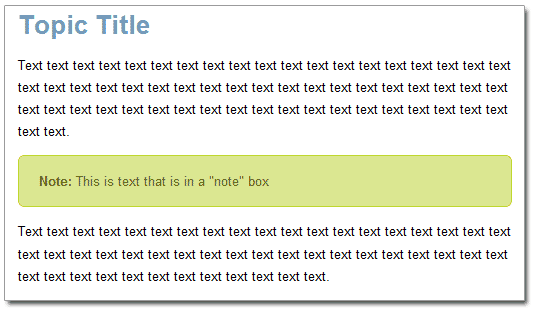
This example works with both PDF and Web outputs. Since it does use some CSS3 for the rounded corners, the corners will appear 'square' in PDF and older browsers.
Create the style
For the steps to create a new style class from withing the Flare CSS Editor, see https://help.madcapsoftware.com/flare9/Default.htm#Styles/Creating_New_Styles.htm
To save some time, copy the code below and paste it into the CSS that you are using. This will create a paragraph style called "note" that we can use in the editor, and that we can access from the right-click menu from the structure bars.
- In the Content Explorer, go to the Resources Folder
- In the Resources Folder you should see a Stylesheets Folder
- Right-click the style sheet that you are using and open it it using the Internal Text Editor
- Copy and Paste the code below into it.
- Save and Close the Internal Text Editor
p.note
{
     color: #616E14;
     border: solid 1px #BFD62F;
     background-color: #DAE691;
     -moz-border-radius: 6px;
     -webkit-border-radius: 6px;
     border-radius: 6px;
     padding: 14px 20px;
     mc-auto-number-format: '{b}Note: {/b}';
}
Apply the style
Open a topic in the Topic Editor and either type a new paragraph or select a paragraph that you want to apply the "Note" style to.
Right-click the block bar and select the p.note style:
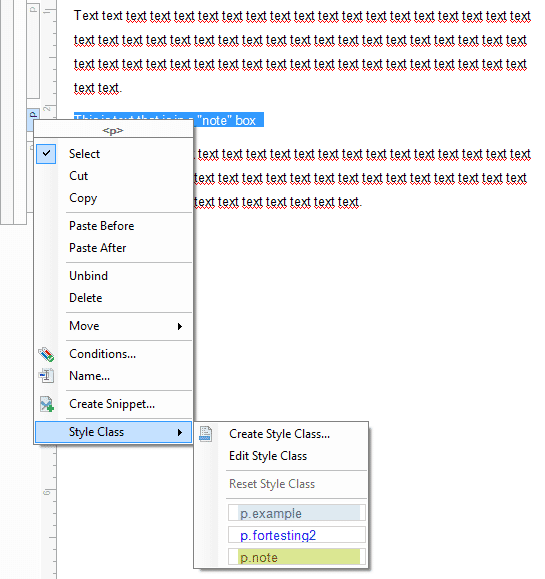
The note will be applied and it will be rendered similar as it will be in Web and Print (minus the rounded corners). Notice that because of the auto-numbering, the "Note" text is formatted bold and automatically added to the paragraph for you as part of the "box".
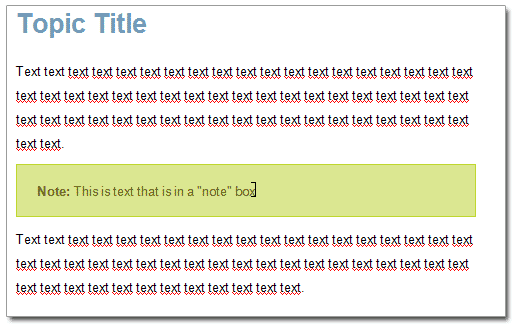
You can use the same process to create several of these paragraph styles for Example, Tip, and other "boxes" that you may need. You will want to change the style name and auto-numbering text to reflect the type of box it is. For example: paste another copy of the code above and name it p.example instead of p.note and change the mc-auto-number-format to '{b}Example: {/b}'.